How to set a daily birth control pill reminder on iPhone
Updated
To get a birth control pill reminder at the same time every day, add the pill to the Health app’s Medications with a daily schedule, or set a repeating alarm in Clock. If your pack has a break week with no pills, the Health app offers a cyclical schedule. Log each pill when you take it, so you can check later instead of wondering.
iOS steps below were checked against Apple’s iPhone User Guide for iOS 26 and iOS 27 and Apple Support’s article on adding and logging medications.
Before you start
Your leaflet is the rulebook. It says when to start a pack, whether there’s a break, and what to do if you miss or are late with a pill. Neither Apple’s tools nor the app in this guide give that advice. If anything is unclear, ask your pharmacist or doctor.
Know your pack type. Some packs have a pill for every day, including inactive ones, so you take one every day without a break. Others have a few days with no pills. That decides which schedule you set below.
Set a daily pill reminder in the Health app
- Open the Health app.
- On iOS 27, tap Browse, then tap Medications. On iOS 26, tap the Search button at the bottom right, then tap Medications.
- Tap Add a Medication or Add Medication, type the name, then tap Add.
- Choose the type and strength, tapping Next after each.
- Follow the onscreen instructions to set the schedule and the time you take it.
- For a pack with a break, tap Change under “When will you take this?”, choose On a Cyclical Schedule, and follow the onscreen instructions.
- Tap Next, choose a shape and colors if you like, then tap Done.
Apple notes that the cyclical schedule needs iOS 18 or later. Health reminds you at the scheduled time, and you log the pill by touching and holding the notification, or in Medications under Log.
To be reminded again if you haven’t logged it, tap Options at the bottom of the Medications screen and turn on Follow Up Reminders. You’re reminded 30 minutes after the scheduled time if the pill isn’t logged yet. With that on, you can also turn on Critical Alerts, which play a sound even when a Focus is on or your iPhone is muted.
Use a Clock alarm
An alarm is harder to miss than a notification. Apple’s guide says a Clock alarm sounds even when Silent mode or a Focus is on.
- Open Clock, tap Alarms, then tap the Add button.
- Set the time.
- Tap Repeat and choose every day of the week.
- Tap Label and name it something you’ll recognize.
- Tap the Done button.
An alarm doesn’t know about break weeks and doesn’t record anything. During a break, turn it off in Alarms with the button next to the alarm time, and turn it back on when you start the next pack.
Use Daily Pill Reminder
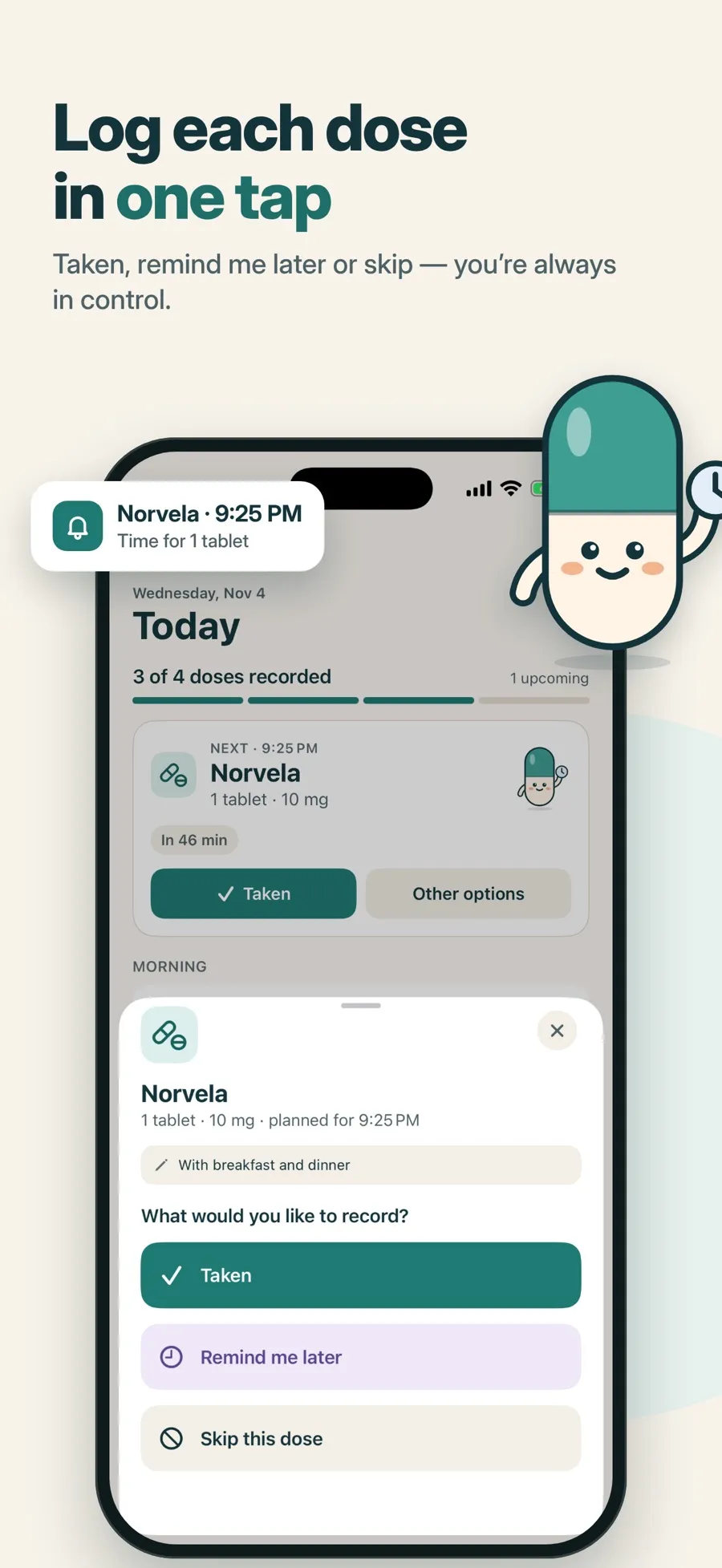
Daily Pill Reminder reminds you at a fixed time and lets you record the pill with one tap on the notification.
- Tap Add medication and enter the pill’s name.
- Optionally set the Category to Birth control, then tap Next.
- Under How often, choose Every day, set the time under Times, then tap Next.
- Review and tap Save medication, then allow notifications.
When the reminder arrives, tap Taken on the notification. If you can’t take it right then, open the app and choose Remind me later to move just that reminder.
If your pack has a break week
The app doesn’t have a 21/7 or other cycle schedule. For a break week, open the medication and tap Pause reminders. When you start your next pack, tap Resume reminders. If your pack has a pill for every day, the Every day schedule covers it and there’s nothing to pause.
If you forget to log it
If you took the pill but didn’t log it, tap Record now on that dose and choose I took it, with the time or I don’t remember the time. The app records what happened. It doesn’t tell you what to do about a missed or late pill. For that, check your leaflet or ask your pharmacist or doctor.
Louder and more private, if you want
- Alarm: on iOS 26 or later, Premium lets you turn on Add an alarm in the schedule step for a louder alert. Stop only silences it and records nothing; Open opens that dose so you can record it.
- Privacy: Hide names on Lock Screen & widgets turns the notification into a plain “Medication reminder”. See how to hide medication names on the Lock Screen.
- Travel: when your time zone changes, the app asks whether to keep the Same clock times or the original timing. If you’re not sure which fits your pill, ask your pharmacist.
The download is free and includes one medication with reminders and the dose log. A paused medication still counts as your one free medication. Premium, a weekly or yearly subscription, adds more medications, alarms, widgets and a doctor PDF report. There’s no account to create, and your records are stored on your device.
Quick answers
How do I get a birth control reminder at the same time every day?
Add the pill to the Health app’s Medications with a daily schedule, set a repeating Clock alarm, or add it to Daily Pill Reminder with Every day and one time. Each reminds you at the time you set.
Can iPhone handle a pill pack with a break week?
The Health app has an On a Cyclical Schedule option on iOS 18 or later. Daily Pill Reminder doesn’t have cycle schedules, so you use Pause reminders for the break and Resume reminders when you start the next pack.
What should I do if I missed a pill?
Check your pill’s leaflet, or ask your pharmacist or doctor. Reminder apps, including Daily Pill Reminder, record what you tell them but can’t tell you what to do about a missed pill.
Can I hide that it’s birth control on my Lock Screen?
Yes. In iOS Settings you can stop notification previews from showing on the Lock Screen. In Daily Pill Reminder, Hide names on Lock Screen & widgets shows only “Medication reminder” in notifications.
Does a Clock alarm go off in Silent mode?
Yes. Apple says Clock alarms sound even when Silent mode or a Focus such as Do Not Disturb is on.
