How to make a wedding countdown on iPhone
Updated
For a wedding countdown on iPhone, add the wedding to a countdown app with the Wedding category, the ceremony time and the venue’s time zone. Share it with your partner so you both see the same number, and add a widget if you want it on your Home Screen. Calendar can hold the date and remind you ahead of time, but it doesn’t count down.
iOS steps below were checked against Apple’s iPhone User Guide for iOS 26 and iOS 27.
Put the wedding in Calendar
Calendar is useful for the plan around the day: the ceremony time, the venue and alerts. If the wedding is in another time zone, you can schedule it in the venue’s time:
- Open Calendar and, in Day view, tap the Add button. On iOS 26, it’s at the top of the screen.
- Enter the title and the venue as the location.
- Tap the start and end times, then tap Time Zone.
- Search for the venue’s city, tap it, then tap the Done button.
To get a heads-up beforehand, tap the event, tap Edit, tap Alert and choose when you want to be reminded. If you’re planning it together, a shared iCloud calendar lets you both add and edit events. See how to share a countdown with your partner for the steps.
Make the countdown in Shared Countdown
Shared Countdown shows how many days, or days, hours and minutes, are left until the ceremony, on your phone and your partner’s.
- Open the app (it’s called Countdown on your Home Screen) and tap the plus button, Create event.
- Name it, for example “Our wedding,” and choose the Wedding category.
- Under When, tap Choose a date and pick the wedding day.
- Tap Add a time and set the ceremony Time. If the wedding is in another time zone, tap Time zone and search for the venue’s city.
- Under Countdown display, choose Days, hours & minutes if you want to watch the hours go down too.
- Under Who can see this, choose Shared with your partner, then tap Save & share.
If you haven’t paired yet, the app shows Share with your person and asks you to invite someone first. Pairing takes an 8-character code and Sign in with Apple. Until then, save it as Only me and share it later by editing the event.
Give it a look
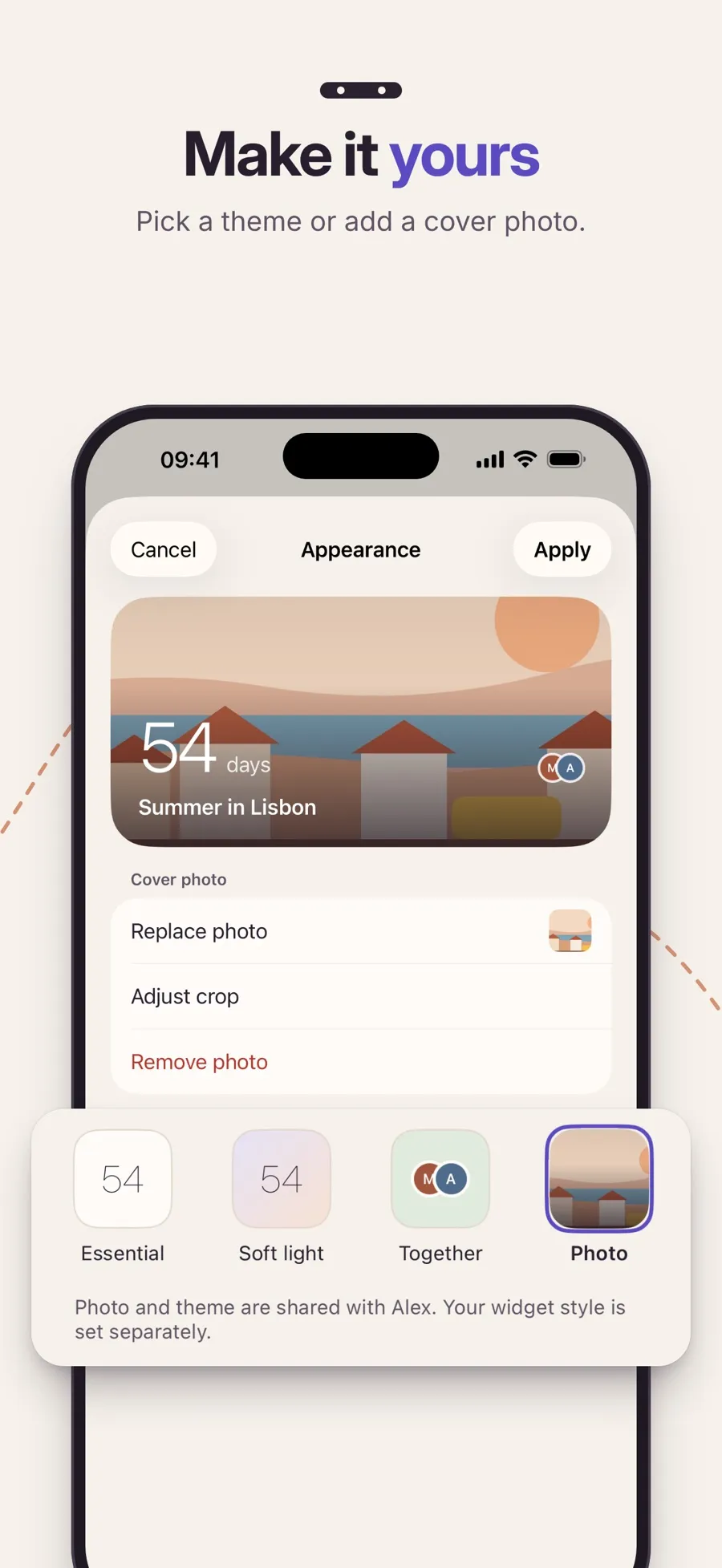
When you create or edit the event, tap Look to open Appearance. Essential is free. With Premium, you can choose Soft light, Together or Photo, and add a Cover photo, such as one from your engagement, then tap Apply. On a shared event, the photo and theme are shared with your partner.
Put it on your Home Screen
With Premium, add the Countdown widget: touch and hold an empty spot on your Home Screen, tap Edit › Add Widget, search Countdown, pick Small or Medium, then tap the widget while editing to choose the wedding. Your partner can pick a different widget look on their phone, because the widget style is personal.
On the day
With a ceremony time set, the countdown shows It’s here from the ceremony time until the end of the day. Without a time, the day shows Today. The next day, the event shows Event ended and moves to Past. A wedding doesn’t repeat yearly. For the anniversaries after it, create a Special Day with Repeat yearly on.
The countdown, sharing with your partner and the Essential look are free. Premium is a yearly subscription for the widget, reminders 30, 7 and 1 day before, cover photos and the Soft light, Together and Photo looks. One subscription covers both of you while you’re paired. The app runs on iPhone and iPad with iOS 18 or later.
Quick answers
How do I make a wedding countdown on my iPhone?
Add an event in Shared Countdown with the Wedding category and the wedding date. Add the ceremony time and the venue’s time zone if you want the count to end at the ceremony, not at midnight.
Can my partner and I both see the wedding countdown?
Yes. Pair in Settings › Partner, then choose Shared with your partner under Who can see this. The event shows on both phones, and either of you can edit it.
Can I put a wedding countdown on my Home Screen?
Yes, with Premium. Shared Countdown’s Countdown widget comes in Small and Medium sizes and five looks, including one with your own photo.
Can guests or family see our wedding countdown too?
Not in Shared Countdown. You share events with one paired person. To share the date with more people, use a shared iCloud calendar.
Will it count our anniversary after the wedding?
Not on its own. A wedding event ends after the day. For anniversaries, create a Special Day with Repeat yearly turned on, and it counts down to the date every year. See how to never forget an anniversary on iPhone.
