How to never forget an anniversary on iPhone
Updated
To be reminded of an anniversary every year on iPhone, create a reminder in Reminders on the date, set it to repeat yearly, and add an Early Reminder so it reaches you days ahead, not on the day itself. If you’d like to see it coming for longer, a countdown app with a yearly repeat shows the days left all year and can remind you a month, a week and a day before.
iOS steps below were checked against Apple’s iPhone User Guide for iOS 26 and iOS 27.
Set a yearly reminder in Reminders
- Open Reminders, tap the New Reminder button and enter a title, such as “Our anniversary.”
- Tap the Edit Details button and turn on Date, then choose the date of this year’s anniversary.
- Tap Repeat, then choose the frequency: yearly.
- Tap Early Reminder, then choose how far ahead you want a heads-up.
- Tap the Done button.
The early reminder is what saves you: on the day, it’s too late to book a table. To make the reminder harder to miss, turn on Urgent in the same details to get an alarm when it’s due.
A reminder with a date also shows in Calendar as an all-day item, so it appears alongside your other plans. If you’d rather add the anniversary as a Calendar event, you can give it an alert: tap the event, tap Edit, tap Alert and choose when you want to be reminded.
Count down to your anniversary with Shared Countdown
Shared Countdown keeps the anniversary on a list with the days left, so it isn’t only a notification that turns up once a year.
- Open the app (it’s called Countdown on your Home Screen) and tap the plus button, Create event.
- Name it, for example “Our anniversary,” and choose the Special Day category.
- Under When, tap Choose a date and pick the date. With a yearly repeat, it doesn’t have to be in the future, so the original date works.
- Turn on Repeat yearly. If the date is February 29, choose whether other years use February 28 or March 1.
- Choose Only me or Shared with your partner under Who can see this, then save.
After each anniversary, the countdown rolls over to next year’s date. Repeat yearly is available for Special Day and Birthday events. A Wedding or Date event is one-time, so for the anniversaries that follow a wedding, use Special Day.
Add reminders before the day
With Premium, open the event and tap Your reminders. Under Remind me, each of these is a toggle, and all three are on by default:
- 30 days before, time to plan something
- 7 days before, time to book it
- 1 day before, a nudge the day before
Set the time under Remind me at. It’s 9:00 AM in your local time unless you change it.
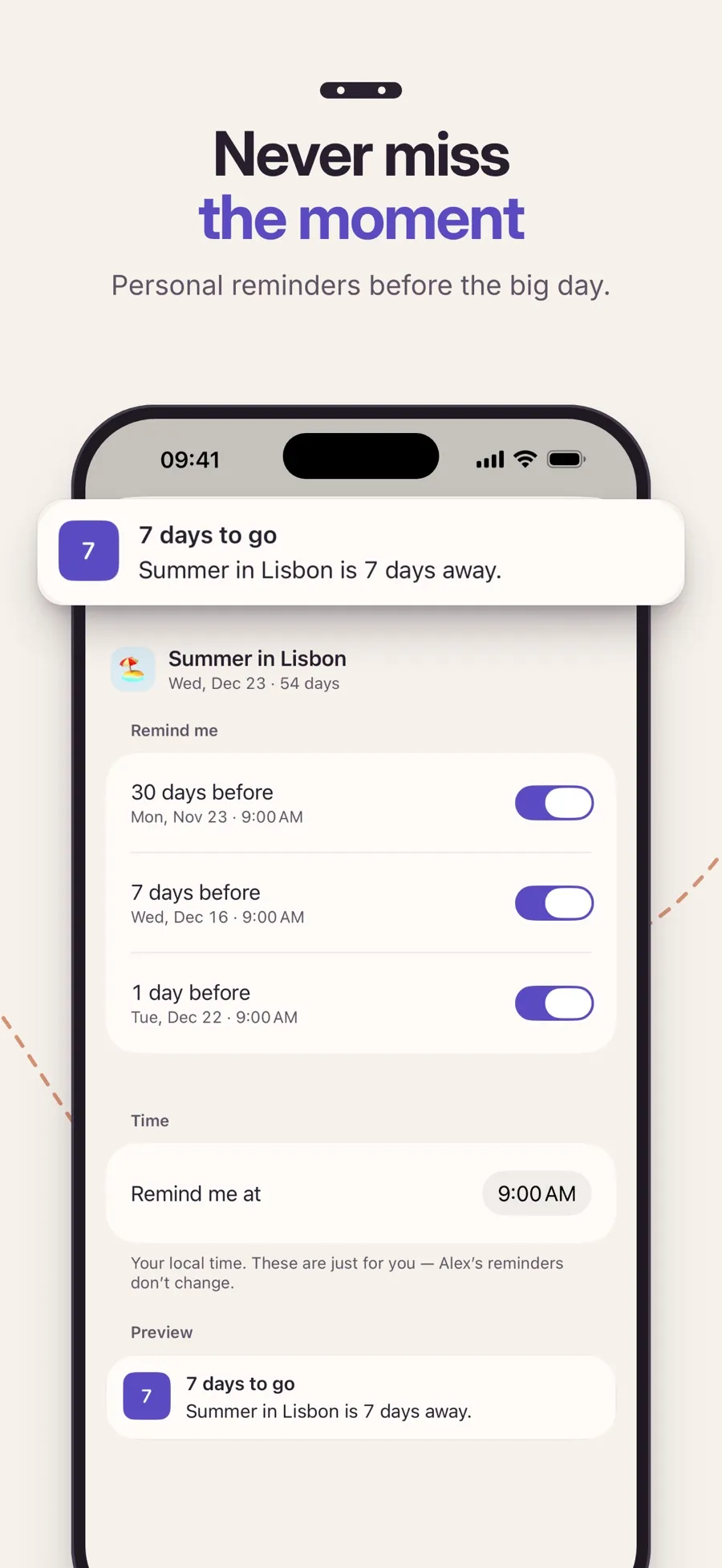
Reminders are personal, even on a shared event. If you share your anniversary with your partner, each of you sets your own reminders, and turning yours off doesn’t change theirs.
The countdown and the yearly repeat are free. The reminders before the day are part of Premium, a yearly subscription that also adds Home Screen widgets, cover photos and more looks. If you’re paired, one subscription covers both of you. The app runs on iPhone and iPad with iOS 18 or later.
For birthdays, see how to make a birthday countdown on iPhone.
Quick answers
How do I get reminded of an anniversary every year on iPhone?
In Reminders, create a reminder on the date, tap the Edit Details button, tap Repeat and choose yearly. Add an Early Reminder so you hear about it before the day.
Can I get a reminder a week before an anniversary?
Yes. In Reminders, use Early Reminder. In Shared Countdown, Premium reminds you 30, 7 and 1 day before, and you can turn each one off.
Which category should I use for an anniversary in Shared Countdown?
Special Day. It’s one of the two categories, with Birthday, that can repeat yearly.
Will my partner get my anniversary reminders?
No. In Shared Countdown, reminders are personal. Your partner sees the shared countdown and sets their own reminders, if they want them.
Are Shared Countdown reminders free?
No. Reminders are part of Premium. Counting down to an anniversary and repeating it every year are free.
