How to keep an aquarium water test log on iPhone
Updated
To keep a log of your aquarium water tests on iPhone, make a table in Notes with a column for the date and one for each value you test, and add a row every time you test. If you’d rather work with the numbers later, use a spreadsheet in Numbers. An aquarium app such as Aquarium Log keeps the tests with your water changes and, with Premium, shows how each value changes over time.
iOS steps below were checked against Apple’s iPhone User Guide for iOS 26 and iOS 27 and the Numbers User Guide for iPhone.
What to write down each time
- The date and time you took the sample, and which tank it came from if you have more than one.
- Each value exactly as your kit shows it, with its unit. Leave out what you didn’t test, rather than writing 0.
- Which form of nitrate your kit reports. The Merck Veterinary Manual notes that many test kits measure nitrate-nitrogen (NO3-N) rather than nitrate (NO3), and that NO3-N multiplied by 4.4 gives NO3 (Merck Veterinary Manual: environmental diseases). Check your kit’s instructions and log it the same way every time.
- Anything you noticed, such as cloudy water, a water change the day before or new fish.
How often to test is up to you and your tank. OATA suggests at least once a week, and more often when a tank is new (OATA: testing water quality in a freshwater aquarium).
Make a test table in Notes
- Open Notes and tap the New Note button.
- Type a title on the first line, such as “Living room tank: water tests”. The first line becomes the note’s title.
- Tap the Add Table button.
- In the first row, type the column headings: Date, pH, Temperature, Ammonia, Nitrite, Nitrate, and any others you test.
- Add a row for each test, then tap the Done button.
A note is quick to open next to your test kit, and it’s easy to share. It doesn’t do anything with the numbers, though.
Use a spreadsheet in Numbers
- Open Numbers and tap Choose a Template at the top of the screen. If you don’t see it, tap the Create Spreadsheet button.
- Tap a template to open it.
- Tap a table cell to type your headings and values.
Numbers saves your changes as you work. Give the spreadsheet a name, so it’s easy to find next time.
Both options depend on you being consistent: a blank cell and a 0 look much alike in a long table, and neither app reminds you to test.
Log water tests in Aquarium Log
Aquarium Log records water tests per tank, next to your water changes, cleanings and notes.
- On the Tank tab, tap Add test. You can also tap the + button and choose Water test.
- Check the Tank and the Sampled date and time.
- Under Fill in only what you measured, enter your values: pH, Temperature, Ammonia, Nitrite, Nitrate, GH and KH.
- Tap Save.
The units: pH has no unit, ammonia, nitrite and nitrate are in mg/L, GH in dGH and KH in dKH. Temperature follows your choice of °C or °F in Settings › Aquarium.
“—” means not measured. 0 means you measured zero. That keeps the difference clear when you look back. The app only checks that a value is a number, not negative, and that pH isn’t above 14. It doesn’t show safe ranges or warnings: what’s right depends on your species, so check their needs and your test kit’s guidance.
To note how the water looks, tap the + button, choose Observation, and pick Clear water, Slightly cloudy or Cloudy.
Look back at your tests
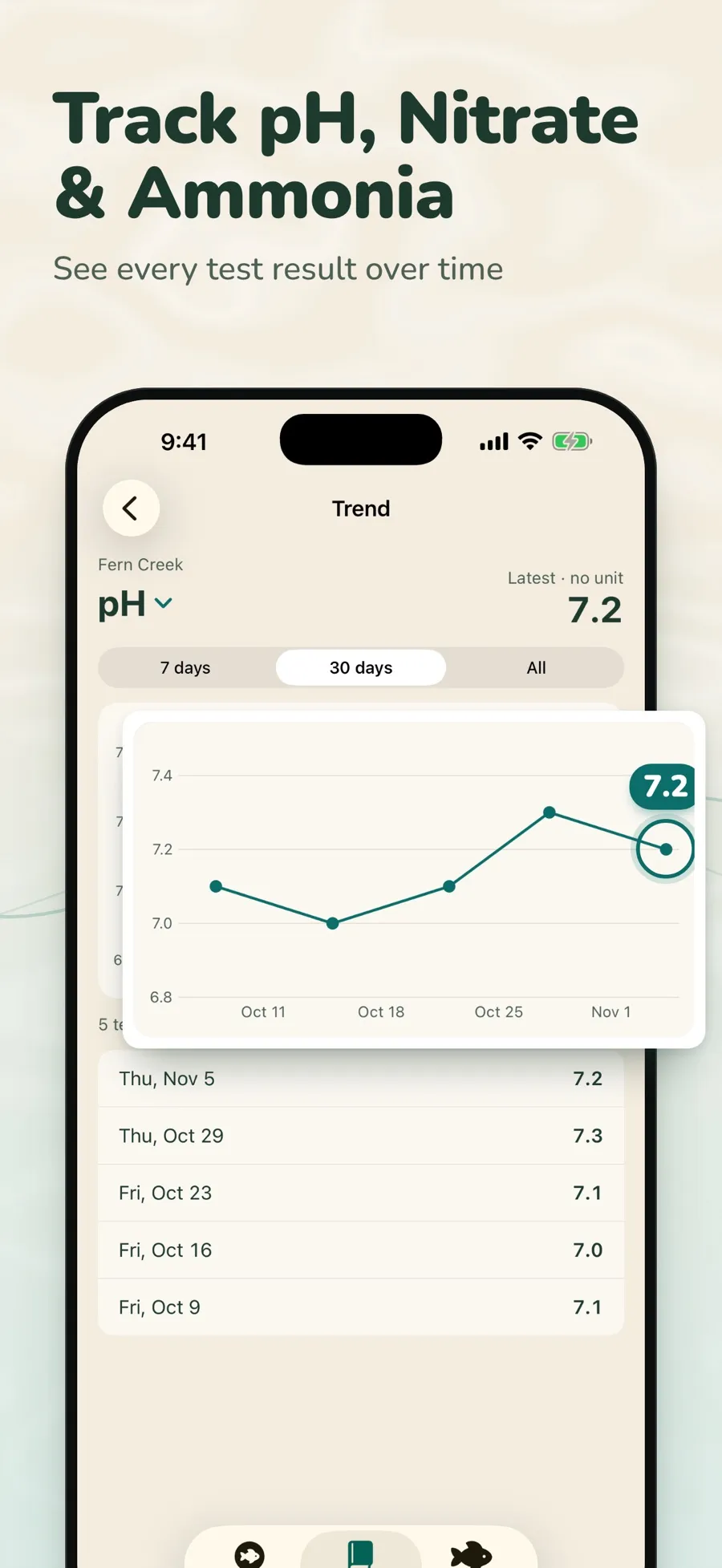
In the Logbook tab, filter by Tests to see only water tests. With Premium, tap a test, then tap Trend to see one value over 7 days, 30 days or All, with the lowest, highest and latest reading. Choose another value from the parameter menu. Gaps of more than 10 days between tests show as a dashed line.
A few limits to know:
- Saltwater tanks log the same seven values. There’s no field for salinity, specific gravity, calcium, alkalinity, magnesium or phosphate.
- No export. Your tests stay on your device, with no account, iCloud sync or export. If you need to share your readings, a Notes table or a Numbers spreadsheet is easier to send.
- Corrections. You can delete an entry from the Logbook. That can’t be undone.
Logging water tests is free. The trend charts are part of Premium, a weekly or yearly subscription that also adds more tanks and a Home Screen countdown widget. The app runs on iPhone and iPad with iOS 18 or later.
Not sure what a value means? See aquarium water parameters explained.
Quick answers
How do I make a water test log on iPhone without an app?
Open Notes, start a new note and tap the Add Table button. Use one column for the date and one for each value you test, and add a row every time you test. Numbers works too if you prefer a spreadsheet.
Should I write 0 for a value I didn’t test?
No. Leave it blank, so a 0 always means you measured zero. In Aquarium Log, “—” means not measured and 0 means you measured zero.
Does Aquarium Log tell me if my water values are safe?
No. It records your values and, with Premium, shows how they change over time. What’s right depends on the species you keep, so check their needs and your test kit’s guidance.
Can I see a chart of my nitrate or pH tests?
Yes, with Premium. In Aquarium Log, tap a test in the Logbook, then Trend, and pick the value and the period: 7 days, 30 days or All.
Can I export my water test log from Aquarium Log?
No. This version has no export or sync, and your data stays on your device. If you need to send your readings to someone, keep them in Notes or Numbers.
