How often should you change aquarium water?
Updated
For an established aquarium, care sources commonly recommend a partial water change every week. RSPCA Australia suggests changing 10 to 25% of the water weekly, and the Ornamental Aquatic Trade Association (OATA) up to 25% every week. That’s a starting point, not a rule: the right amount and rhythm depend on how many fish you keep, the size of the tank, your plants and filter, and what your water tests show.
Guidance below comes from RSPCA Australia, OATA and the Merck Veterinary Manual. It’s general information. For a particular tank, go by your test results, your test kit’s instructions and the needs of the species you keep.
What care sources commonly recommend
- RSPCA Australia: once a tank is established, weekly partial water changes of 10 to 25%, together with a gravel clean. In the first weeks of a new tank, it suggests partial changes roughly every 2 to 3 days, and testing ammonia and nitrite every 2 to 3 days for the first six weeks (RSPCA Australia: why water quality matters).
- OATA: partial water changes of up to 25% every week, and it notes that the frequency and size can vary with the species, the size of the aquarium and the number of fish (OATA: setting up and looking after a freshwater aquarium).
- Merck Veterinary Manual: small containers such as goldfish bowls and betta tanks may need as much as 50% a week. In a new tank, if ammonia or nitrite rises, frequent water changes help keep it down (Merck Veterinary Manual: providing a home for fish).
What changes the answer for your tank
- How many fish you keep. Fish produce ammonia as waste, and uneaten food adds more, according to OATA. More fish, or more food, means more waste to remove.
- Tank size. The same amount of waste is more concentrated in a small volume, which is why small tanks may need bigger or more frequent changes.
- Plants. Live plants use some of the nitrate, but OATA is clear that this doesn’t mean you can skip water changes.
- Filtration. Bacteria in the filter turn ammonia into nitrite and then nitrate. Nitrate is much less toxic, but it builds up, and water changes are one of the main ways to remove it.
- A new tank. The filter bacteria take around 4 to 6 weeks to establish, according to both the Merck Veterinary Manual and RSPCA Australia. During that time, test more often and expect to change water more often.
- Your test results. OATA suggests testing at least once a week. If nitrate keeps climbing from one water change to the next, that’s a sign to change more water or change it more often. Check the species’ care information for the level to keep.
To read what each value means, see aquarium water parameters explained.
Changing water without stressing your fish
- Treat tap water. Add a water conditioner that neutralises chlorine and chloramine before the new water goes in. RSPCA Australia and the Merck Veterinary Manual both make this point.
- Match the temperature. The Merck Veterinary Manual notes that sudden changes of even a few degrees can compromise a fish’s immunity (Merck Veterinary Manual: environmental diseases).
- Look after the filter. Rinse filter media in old tank water from the change, not under the tap, so you don’t kill the bacteria, OATA advises.
Keep the rhythm with Aquarium Log
Once you’ve chosen how often, the hard part is keeping to it. Aquarium Log holds a care plan for each tank and counts down to the next water change.
- Open the tank’s care plan: tap the tank name at the top and choose Care plan.
- Under Water change, tap Repeat and choose every 3, 5, 7, 10, 14, 21 or 30 days. For weekly changes, choose Every 7 days.
- Set the date and time of the next one, and turn on Remind me if you want a notification.
- Tap Save.
When you’ve done a change, tap Log water change and enter the Amount changed in L, US gal or %. The next date then moves forward by your interval from the time you finished, and your logbook shows how much you changed each time.
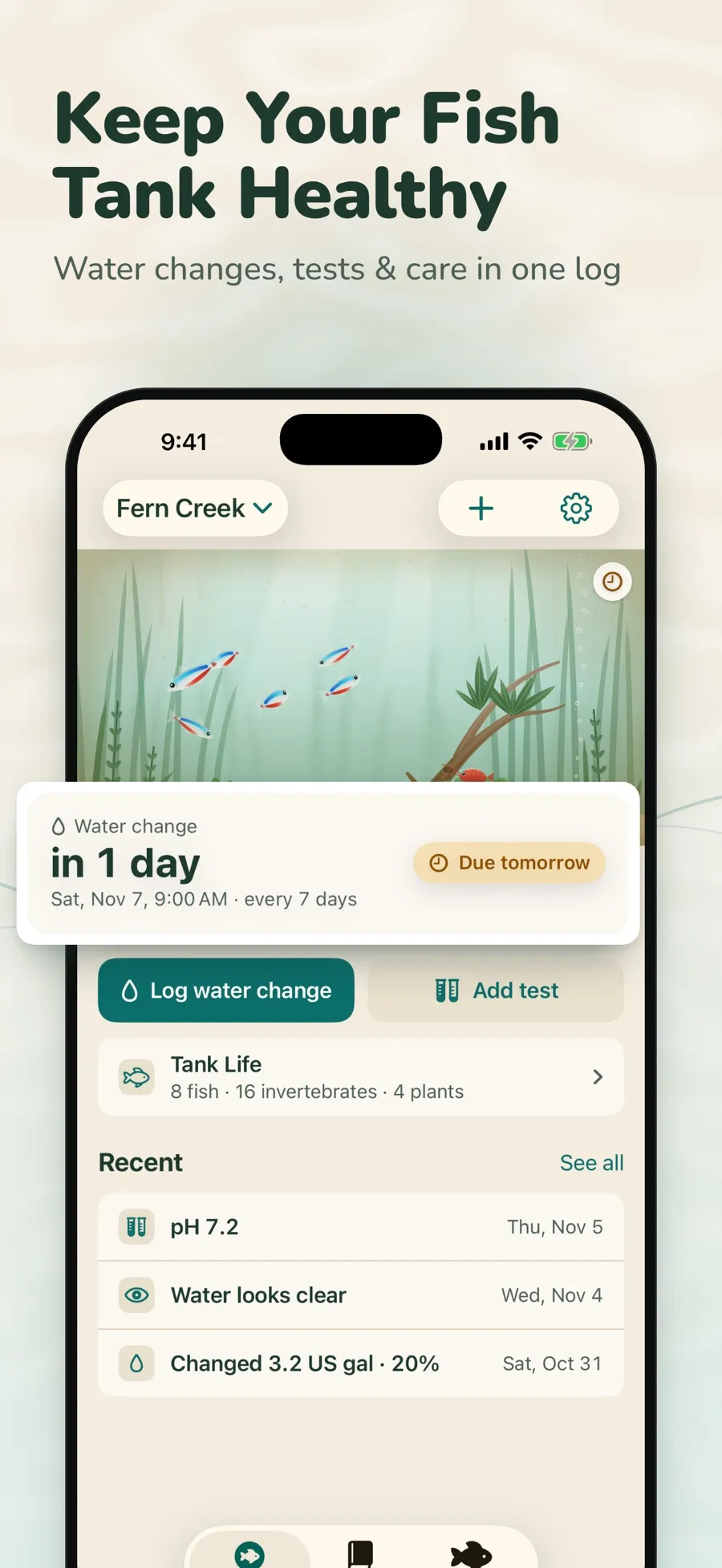
The app doesn’t tell you how often to change the water, and it doesn’t judge your test results. You choose the interval. If your tests suggest a different rhythm, change Repeat in the care plan. There are no custom intervals beyond the seven listed.
The download is free and includes one tank with the care plan, reminders, logbook and water tests. Premium, a weekly or yearly subscription, adds more tanks, test trend charts and a Home Screen countdown widget. It runs on iPhone and iPad with iOS 18 or later.
To set up the reminder step by step, see how to set an aquarium water change reminder on iPhone.
Quick answers
How often should I change my aquarium water?
Care sources commonly recommend a partial change every week for an established tank. RSPCA Australia suggests 10 to 25% weekly, and OATA up to 25% every week. The right rhythm depends on your fish, tank size, plants, filter and test results.
How much water should I change at once?
Commonly 10 to 25% for a weekly change, according to RSPCA Australia and OATA. The Merck Veterinary Manual notes that small bowls and betta tanks may need as much as 50% a week.
Do planted tanks still need water changes?
Yes. Plants use some of the nitrate, but OATA says this doesn’t mean you won’t have to do water changes.
How often should I change the water in a new tank?
More often than in an established one. RSPCA Australia suggests frequent partial changes of 10 to 25% in the first weeks, while the filter bacteria establish, which takes around 4 to 6 weeks. RSPCA Australia also suggests testing ammonia and nitrite every 2 to 3 days for the first six weeks.
Can Aquarium Log tell me how often to change my water?
No. You set the interval, every 3 to every 30 days, and the app counts down and reminds you. It records your water tests but doesn’t judge them.
